1. Export Markers from Avid Pro Tools
Open the Markers panel in Pro Tools and export the markers as the .txt file. Alternatively, you can choose "File > Export > Session Info As Text" from the Pro Tools menu and select the Include Markers option to create the text file containing the markers with their location, name, and comments.
2. Use the "Konverter Penanda" to convert the TXT Markers marker file into a CSV file
Open the free Konverter Penanda, select "Avid Pro Tools > TXT Marker (.txt)" and set "convert" to "CSV for Google Sheets". Generate and download the file. Jika Anda mengalami masalah saat mengonversi file, Anda dapat menghubungi dukungan gratis.
3. Import the CSV file into Google Sheets
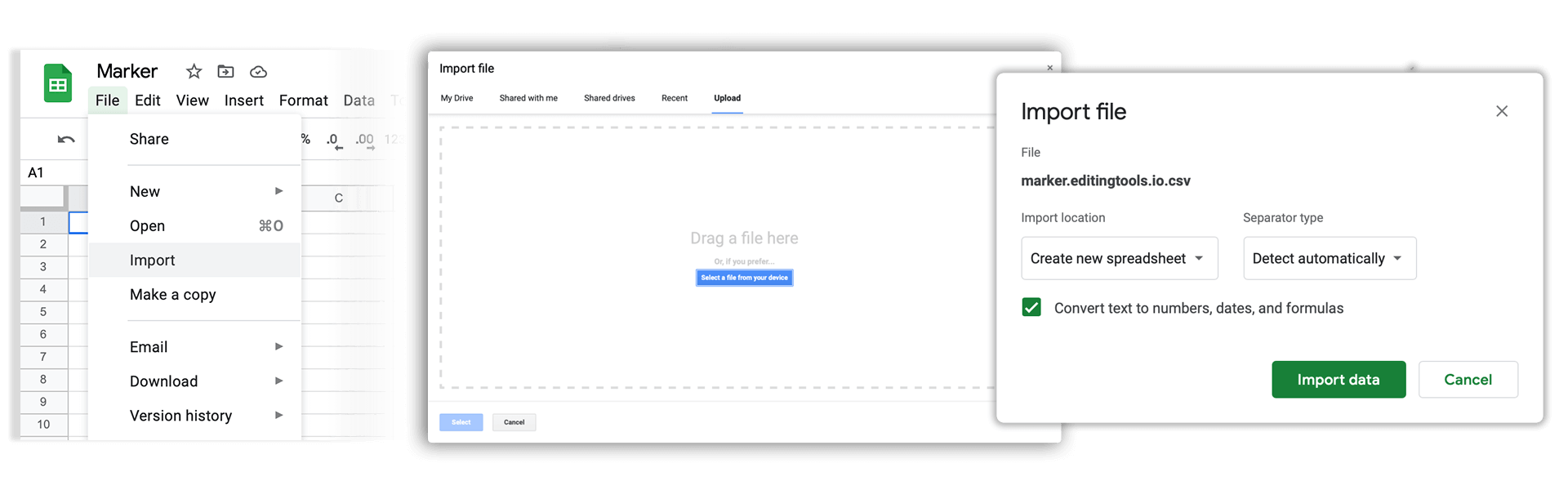
Open Google Sheets and go to "File -> Import". Upload the generated CSV file and press "Import Data" to generate the Sheet with all markers.
🚀 Selesai
Sekian untuk saat ini! Jika tutorial ini bermanfaat, silakan bagikan untuk mendukung kami. Jika Anda punya saran tentang cara menyempurnakan alur kerja ini, beri tahu kami!