1. Export a CSV marker file from Pix
Open the comments panel on the right side in Pix. Press the three dots and select "Export". Now you can then download the CSV file from Pix.
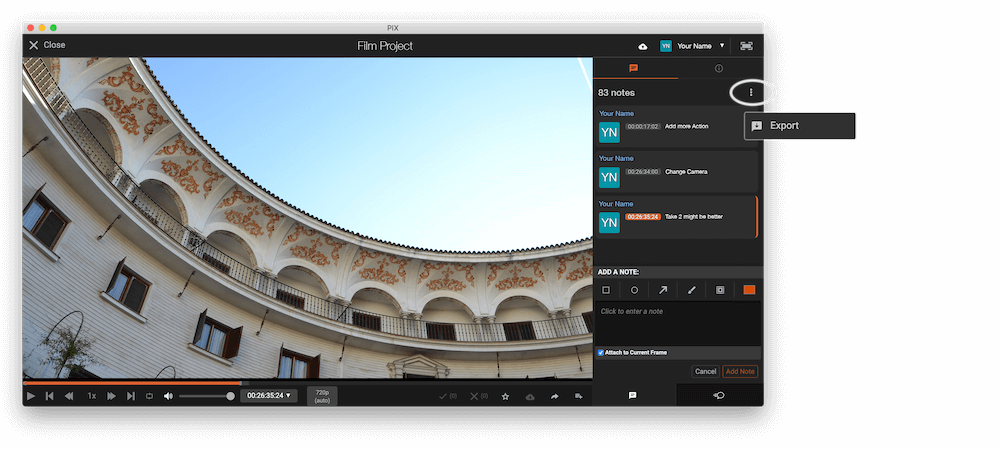
The timecode in Pix starts with 00:00:00:00 for each clip, so you may need to use the offset function on EditingTools.io to sync it with you timeline or move it manually in your NLE (editing software).
2. Use the "Konverter Penanda" to convert the CSV marker file into a SRT subtitle file
Open the free Konverter Penanda, select "Pix Systems > Comments (.csv)" and set "convert" to "SRT". Generate and download the file. Jika Anda mengalami masalah saat mengonversi file, Anda dapat menghubungi dukungan gratis.
3. Import the SRT subtitle file in Adobe Premiere Pro
Open your project in Premiere Pro and go to File > Import. Select the SRT file and import it. You can drag and drop the subtitle file simply into your sequence.
🚀 Selesai
Sekian untuk saat ini! Jika tutorial ini bermanfaat, silakan bagikan untuk mendukung kami. Jika Anda punya saran tentang cara menyempurnakan alur kerja ini, beri tahu kami!